


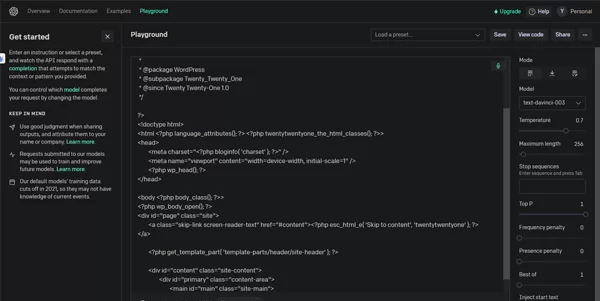




OpenAI Playground is literally a space in your browser to communicate with AI models and test ideas. Type a prompt, hit run on the Prompt button and watch the AI respond.
No downloads, no setup, just a space to create. It is open to any user with a purpose to write, code, or explore new AI-related features.
It can be used to get quick text replies or to do more elaborate coding. You can give the models any kind of test here.
Inside the Playground you can select from various AI models and even define how creative or exact the response should be by sliding a few simple sliders or picking a model from a dropdown menu.
You could even limit how long the answer will be! While it may appear that the controls are simple, they allow you to explore very dynamically. You get real time results, which makes interaction fast and simple.
An OpenAI account is the only requirement. After you log in, you can begin immediately.
It works in most desktop or mobile browsers, switching between models is simple, and you can also save your session and come back to it later.
Even if you have never used AI before, the layout makes it easy to know what to do next.
Playground is free to access, but it uses API credits to use the models. Costs start with only a few cents per 1,000 tokens.
Smaller models cost less, while the newest and advanced models (like GPT-4) costs more.
You can set a budget in your account, so you will never “spend” more than you want to. Setting a budget helps you control your costs, while also exploring.
It feels instant and flexible. You can try different prompts, tweak the settings, and see what happens on the fly, without waiting!
It allows for learning, testing or having fun with AI.
The downside is if you spend too much time running large models, you may run out of credits, quickly. Some of the deeper settings may also be confusing if you don’t have experience.
It is instant. It is flexible. You can try different prompts, change various settings, and see the response without having to wait. It is often used for learning or testing, or just for fun with AI.
Note however, that if you spend an extensive amount of time running these large models, it can eat up your credits quickly. Some of the deeper settings may also be confusing to beginners.
Writers use it to get new ideas. Developers test code with ChatGPT before actually adding it, or use it to test other integrations and capabilities.
Students use it to question analytical functions around how AI might respond to different questions.
Teachers use it to explain AI in classrooms. And it is useful to anyone catapulting their efforts and learning how to write better prompts.


